Using a Garmin watch
Chargewise works without a watch. This page is for people who wear a Garmin, or are thinking about it.
You need: your Garmin watch, charged, and your Garmin account (the one you use in the Garmin Connect app). A helper is useful for these steps.
Step 4: Add the watch apps and pair
Check your watch is listed on the Chargewise Sync store page.
On your phone
- Make sure Garmin Connect is installed and your watch is connected to it.
- On Android: phone Settings → Apps → Garmin Connect → Battery → Unrestricted, so it keeps passing on your watch's readings at night.
- Install Garmin's Connect IQ app and sign in with your Garmin account.
- In Connect IQ, find Chargewise Sync and tap Install.
- Optional: find Chargewise Pacing Face and install it too, then choose it as your watch face. It shows your heart rate, Body Battery and today's minutes above your limit (see The watch face).
You can stop here and pair another time.
Pair the watch with Chargewise
Have the watch and phone side by side, and a helper if you can.
- On the watch, open Chargewise Sync from your apps list. It shows Getting a code, then a code. Keep Sync open on the watch until it says Paired.
- On the phone, in Chargewise: Settings → Watch. Type the code in the box, then tap Pair.
- The phone says Code accepted. Waiting for your watch...
- The watch shows Paired. Sending every 15 minutes. You're done, and you can close Sync.
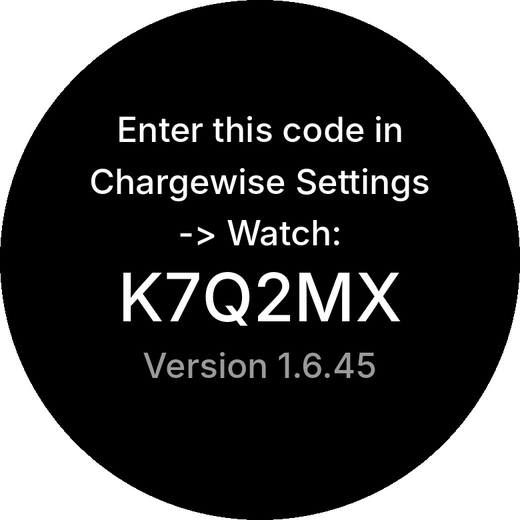
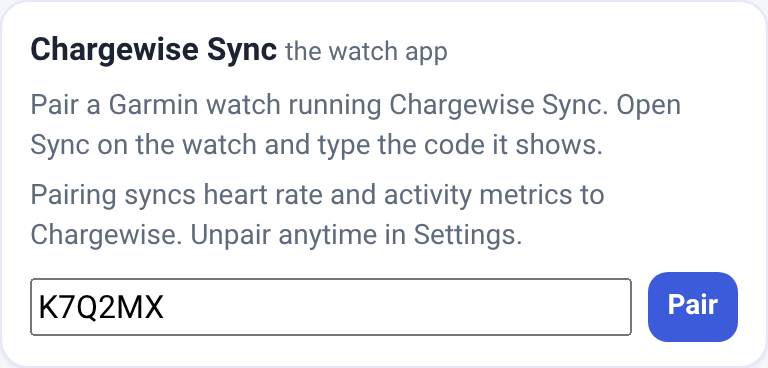
A code lasts 10 minutes. If the watch says Code expired, tap the screen for a new one. Your Garmin password is never needed.
Step 5: Your heart-rate limit and the watch's alert
Set your limit in Chargewise
Decide the number with your healthcare team if you can.
- Tap Settings → Your limits → Heart rate.
- Type your Heart-rate limit and tap Save.
Chargewise then counts your minutes above it. The next day it may ask what you were doing when you stayed above it for 4 minutes or more (at most 2 questions for each part of the day). Answering is up to you: tap Nothing notable, or just leave it.
Chargewise can't set the watch, so the watch's alert is set by hand to the same number.
Make a Pacing activity on the watch
This takes many button presses, so a helper is useful. The watch's own heart-rate alert works only while an activity is running. These steps are for the vívoactive 5; other watches are similar but not the same.
- Press the top button (A) for the activities list. Scroll to the bottom and tap the edit icon, then +, then the copy icon.
- Choose Yoga and name the copy Pacing.
- Open Pacing, hold the bottom button (B), then Settings → Alerts → Add New → Heart Rate.
- Set High to your limit and switch Low off.
Each day, if you want the alert
Start Pacing in the morning and stop it at night.
- To start: press A, choose Pacing, then press A again.
- To stop: press A, then tap ✓ to save.
Stopping it at night matters: while Pacing is running, the watch doesn't record HRV, so that night's HRV would be missing.
After pairing, Settings → Watch may offer to add "start Pacing" and "stop Pacing" to your morning check-in and wind-down reminders: tap Add or No thanks.
The watch face
Only if you installed Chargewise Pacing Face in Step 4.
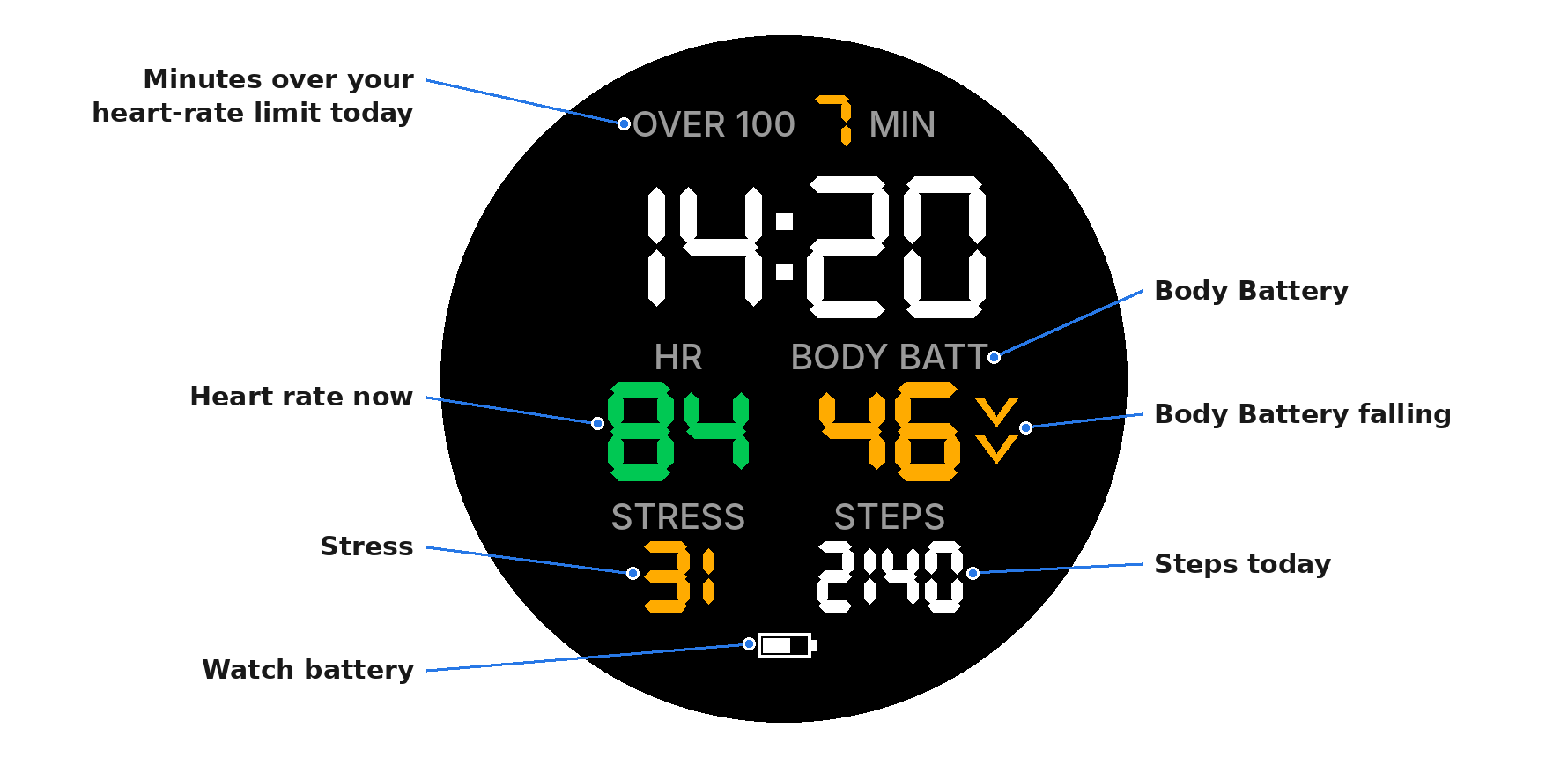
- Minutes over your heart-rate limit today (top line). The number after OVER is your limit, from Chargewise. The minutes are green for 0 to 4, amber for 5 to 10 and red for more than 10. It can differ from Chargewise's own count by a minute or so.
- Heart rate now. Green below your limit, red above it. If you set a caution line in Chargewise, it's amber from that line up to your limit.
- Body Battery (Garmin's energy estimate). Green 51 and over, amber 26 to 50, red 25 or under.
- Body Battery falling: two arrows beside it. Amber when it's 3 or 4 below its highest in the last 30 minutes; red when it's 5 or more below. No arrows when it's 0 to 2 below.
- Stress (Garmin's stress level). Green 0 to 25, amber 26 to 50, red over 50.
- Steps today.
- Watch battery. Red at 20% or less.
When the screen dims, only the time shows. The face can't vibrate: the buzz comes from the Pacing activity's alert.
Watches and Garmin
Which watches work?
48 round-screen Garmin models are listed on the store pages for Chargewise Pacing Face and Chargewise Sync.
So far the apps have been tested on one watch, a vívoactive 5.
Why Garmin?
Garmin watches have the three things Chargewise uses: overnight HRV, a heart-rate alert on your wrist when you go over your limit, and Body Battery.
What about other watches?
If your watch has a heart-rate alert and measures HRV, message us at support@chargewiseapp.net and we'll see what we can do.
Why does "your normal" need 21 nights?
Your normal is worked out from your own nights, and a few nights can't show what's usual for you. Garmin's own HRV status waits for the same reason: it needs three weeks of sleep data.
So Chargewise waits for 21 nights with a reading. A missed night doesn't restart the count; it just takes one more night.
Until then, the day's colour comes from everything else, such as your check-ins, yesterday's events and time above your limit.
The watch apps
What are the two watch apps?
- Chargewise Sync sends your readings to Chargewise every 15 minutes: heart rate (one a minute), Body Battery, steps, and overnight HRV.
- Chargewise Pacing Face is a watch face. It shows your heart rate, Body Battery, and today's minutes above your limit. It sends nothing anywhere.
You can use Sync without the face.
How does my watch connect to my Chargewise account?
Open Sync on the watch and it shows a code. Type the code into Chargewise under Settings → Watch. Your Garmin account isn't involved.
To stop sending, tap Unpair in the same place.
Why a watch app rather than connecting to my Garmin account?
We looked at every way to get your watch data:
- Garmin's programme for apps that connect to your account was closed to new apps from about May 2026. It reopened on 21 October.
- Garmin's personal key gives one person their own data. Garmin says it isn't for apps serving other people.
- Signing in with your Garmin password works, but it isn't Garmin's official route. It would also mean Chargewise holding a way into your whole Garmin account, so we ruled it out.
- Paid go-betweens cost about US$3,600–4,800 a year at our size, and they would add another company that handles your data.
A watch app built on Garmin's own app platform, Connect IQ, avoids all of that. You never give Chargewise your Garmin password, and no other company is involved. The watch app also reads your heart rate once a minute, which is twice as often as the Garmin Connect figures we compared it with.
The trade-offs: you install a small app on the watch, it uses some battery, and Chargewise doesn't get Garmin's sleep stages. The watch app works out overnight HRV itself.
Garmin's reopened programme is a possible option for later; we haven't decided to use it.
Relying on Garmin
What does Chargewise depend on Garmin for?
- The store. The watch apps come from Garmin's Connect IQ store, and Garmin approves every app and every update.
- Garmin Connect on your phone. Sync's readings travel from the watch through the Garmin Connect phone app to Chargewise.
- Body Battery. This is Garmin's own figure; Chargewise reads it from the watch.
If Garmin changes or withdraws any of these, the watch parts of Chargewise could stop working until we adapt. Reminders and logging don't depend on Garmin.
What if Garmin's Body Battery is wrong, or it suddenly resets?
Body Battery is Garmin's own estimate, worked out on your watch. Chargewise shows it as it is and can't correct it.
Sometimes Garmin restarts its calculation and the level jumps: Garmin's records have shown 31 drop to 5 at once. A jump like that can change the night's charge and the day's colour.
If the colour doesn't match how you feel, change it; how you feel comes first. Big sudden falls are noted in the weekly review.
Can Garmin see my Chargewise data?
Garmin's phone app carries Sync's readings to Chargewise, under your own Garmin terms. The Privacy Notice says so.
Battery
How much battery does Sync use?
On our test watch (a vívoactive 5), the battery fell 21–28% a day with Sync and the Pacing activity running, so a charge lasted about 3½ to 5 days.
Overnight it used about 0.5% an hour, including the HRV readings, and in the day about 1.3% an hour. That's one watch over three days; other models and other settings will differ.
Why does the battery drop faster than before?
Sync wakes every 5 minutes. At night it takes a short heart-rhythm reading for HRV, and every 15 minutes it sends through your phone. Both use power.
If the drain is too much for you, you can remove Sync and keep the face, which sends nothing.
When something looks wrong
Does Sync need my phone nearby?
Yes, for sending. Sync needs your phone within Bluetooth range, Garmin Connect on the phone, and the phone online.
If the phone is away, the watch keeps about 2 days of heart rate and about 1 day of Body Battery, and Sync catches up when the phone is back.
Today says watch data is missing.
Usually Sync couldn't send overnight: the phone was off, out of range, or offline.
Check that Bluetooth is on and Garmin Connect is running. Settings → Watch shows when Sync last sent. Once it catches up, the figures fill in.
The watch says "Can't reach the phone."
Turn on Bluetooth on the phone, open Garmin Connect, and check that the watch shows as connected there. Then open Sync again.
Something else?
Email support@chargewiseapp.net. Please don't put health details in it.
Garmin, Garmin Connect, Connect IQ, Body Battery and vívoactive are trademarks of Garmin Ltd. or its subsidiaries. Chargewise is not affiliated with, endorsed by, or sponsored by Garmin.